Post
Logitech MX Keys Advanced Wireless Keyboard
May
Logitech MX Keys Advanced Wireless Keyboard: The Ultimate Productivity Typing Experience
When it comes to wireless keyboards designed for professionals and power users, few products have managed to strike the perfect balance between comfort, functionality, and aesthetics quite like the Logitech MX Keys Advanced Wireless Keyboard. Released to widespread acclaim, this keyboard has become a staple on the desks of writers, programmers, designers, and business professionals worldwide. In this comprehensive review, we’ll explore everything this keyboard has to offer, from its thoughtful design philosophy to its impressive technical specifications.
Design and Build Quality
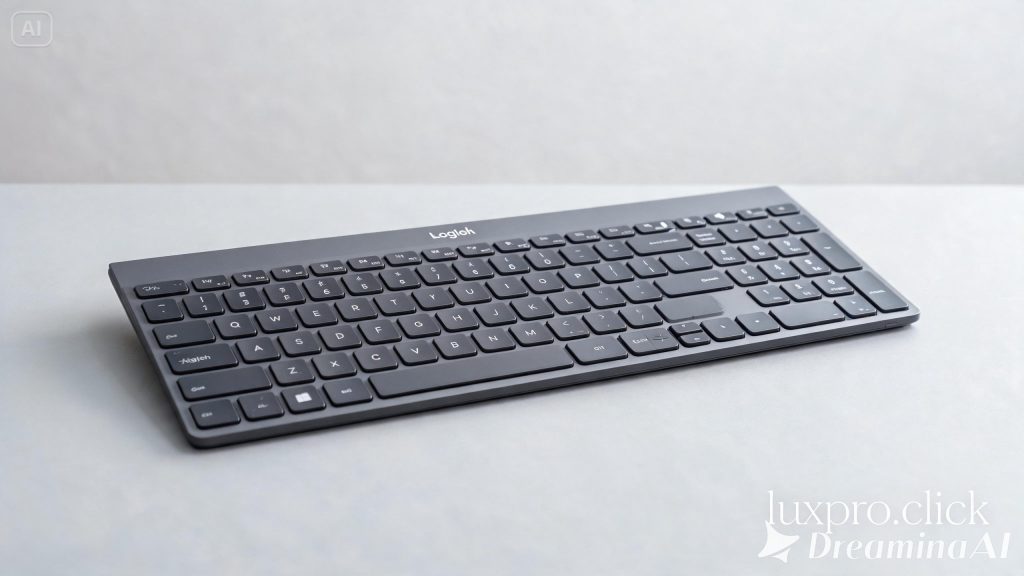
The first thing you notice when you unbox the Logitech MX Keys is its premium build quality. The keyboard features a sleek, low-profile design with a brushed aluminum plate that exudes sophistication. Unlike many keyboards that feel plasticky or hollow, the MX Keys has a solid, satisfying weight to it — weighing approximately 810 grams — that communicates quality without feeling burdensome on your desk. The matte surface finish resists fingerprints exceptionally well, keeping the keyboard looking clean even after hours of intense use.
The keycaps are crafted from high-quality PBT-like material with a unique spherical concave shape — each key is slightly dished to cradle your fingertip and guide it naturally to the center of the key. This design decision, inspired by mechanical keyboard enthusiasts’ preferences, makes a significant difference in typing accuracy. You’ll notice fewer mistyped characters because your fingers always land in the right spot.
Logitech offers the MX Keys in two colorways: graphite and pale grey, both of which look professional and blend well in any office environment. The keyboard measures approximately 430mm × 131mm × 20.5mm, making it a full-size layout with a number pad included, which many productivity users find essential.
Typing Experience and Key Switches
The MX Keys uses low-profile scissor switches, which are notably different from traditional mechanical switches. These switches provide a quiet, fluid typing experience with a travel distance of just 1.8mm and actuation force of approximately 45 grams. For users coming from a mechanical keyboard background, this might feel like an adjustment, but for those who spend long hours typing documents, emails, or code, the reduced finger fatigue is genuinely beneficial.
The keys produce minimal noise — significantly quieter than most mechanical keyboards — making the MX Keys an excellent choice for open offices, co-working spaces, libraries, and video call environments. The keyboard emits a satisfying, subtle click sound that provides tactile feedback without being distracting to colleagues.
The key layout is exceptionally well thought out. The function row includes dedicated media controls, screen brightness adjustment, and quick-access keys that genuinely improve workflow. The top-right corner features a small LED indicator for battery status, Caps Lock, and connectivity mode.
Wireless Connectivity and Multi-Device Support
One of the standout features of the MX Keys is its versatile connectivity options. The keyboard supports both Bluetooth Low Energy and Logitech’s proprietary Unifying Receiver (2.4 GHz USB dongle), giving users flexibility depending on their setup. More impressively, it can pair with up to three different devices simultaneously and switch between them with the dedicated Easy-Switch buttons located at the top-left of the keyboard.
This multi-device capability is a game-changer for professionals who work across multiple computers — perhaps a MacBook for personal use, a Windows desktop for work, and an iPad for note-taking. Simply press the assigned button, and the keyboard seamlessly connects to the next device within seconds. The transition is nearly instantaneous, making it feel like a natural extension of your multi-device workflow.
The keyboard is compatible with Windows, macOS, Linux, iOS, Android, and ChromeOS. Logitech also offers platform-specific versions of the keyboard — one optimized for Mac users with macOS-specific key labels and a lighter space grey colorway.
Battery Life and Charging
Battery anxiety is a real concern with wireless peripherals, but Logitech has addressed this thoughtfully in the MX Keys. The keyboard is rated for up to 10 days of battery life with the backlight enabled and up to 5 months with the backlight off. In real-world use, most users report the backlight-on estimate is accurate if the keyboard is used for typical office hours.
Recharging is done via a USB-C port on the back of the keyboard — a modern, universally compatible charging standard. A 1-minute charge provides approximately 30 minutes of use, and a full charge from empty takes around 3 hours. The USB-C charging capability is a significant advantage over keyboards that still use proprietary or micro-USB connectors.
The keyboard also features a smart proximity sensor using optical detection. When your hands approach the keyboard, the backlighting activates automatically. When you step away, it turns off. This intelligent feature meaningfully extends battery life without requiring you to manually manage backlight settings throughout the day.
Backlighting and Smart Illumination
Speaking of backlighting — the MX Keys features per-key white LED backlighting that automatically adjusts based on ambient lighting conditions. The keys illuminate more brightly in dim environments and reduce brightness in well-lit conditions, thanks to the built-in ambient light sensor. The backlight brightness can also be manually adjusted to your preference.
While the backlighting is only available in white (not RGB like gaming keyboards), this restrained approach is intentional and fits the professional aesthetic perfectly. The uniform white glow is elegant and functional without being distracting.
Software Integration with Logitech Options+
The MX Keys is fully compatible with Logitech Options+, the company’s peripheral management software. Through this application, you can customize the behavior of every key, create application-specific shortcut profiles, adjust pointer speed for a connected Logitech mouse, and configure the Easy-Switch buttons. The software also enables Logitech Flow, which, when combined with a compatible Logitech mouse, allows you to seamlessly move your cursor across multiple computers and even copy-paste content between them.
The software interface is clean and intuitive, with no unnecessary complexity. Even users who aren’t technically inclined will find it straightforward to customize their experience. Logitech Options+ also provides firmware update notifications, ensuring your keyboard always runs the latest improvements.
Ergonomics and Long-Term Comfort
The MX Keys has a fixed tilt angle of approximately 4 degrees, which provides a comfortable wrist angle for most users. While it doesn’t offer adjustable tilt legs like some keyboards, the fixed angle is well-chosen and suited to flat desk setups. For users who prefer more wrist support, Logitech offers the Palm Rest Pro as a separate purchase, which attaches magnetically to the front of the keyboard.
The low-profile design inherently reduces wrist strain because your wrists don’t need to flex upward as much compared to thicker keyboards. Long typing sessions feel comfortable, and many users report significantly less fatigue compared to traditional full-height keyboards.
Performance for Professionals
In day-to-day professional use — writing reports, coding in multiple languages, data entry, and email management — the MX Keys performs flawlessly. The keys respond precisely every time, the connectivity is rock-solid with no dropped characters or lag, and the multi-device switching eliminates the need for multiple keyboards cluttering your desk.
For writers and journalists, the comfortable typing feel over long sessions is a major advantage. For programmers, the dedicated function keys and smart shortcut customization streamline coding workflows. For executives and business professionals, the premium aesthetic and quiet operation make it boardroom-appropriate.
Who Should Buy the Logitech MX Keys?
The Logitech MX Keys is best suited for knowledge workers, content creators, programmers, and professionals who spend significant portions of their day typing. If you value quiet operation, multi-device flexibility, premium build quality, and thoughtful design, this keyboard delivers on every front. It’s not the right choice for gamers who need mechanical switch responsiveness or RGB lighting customization, nor is it ideal for users on a tight budget, as it sits in the premium price segment.
Final Verdict
The Logitech MX Keys Advanced Wireless Keyboard stands as one of the finest productivity keyboards available today. It represents a thoughtful intersection of design, technology, and ergonomics that few competitors can match. The spherical key shape, smart backlighting, multi-device support, USB-C charging, and excellent battery life combine to create a keyboard that genuinely enhances your daily computing experience. If you’re ready to invest in a keyboard that will serve you reliably for years while making every typing session more enjoyable, the MX Keys deserves serious consideration.
Overall Rating: 9.2/10
