Post
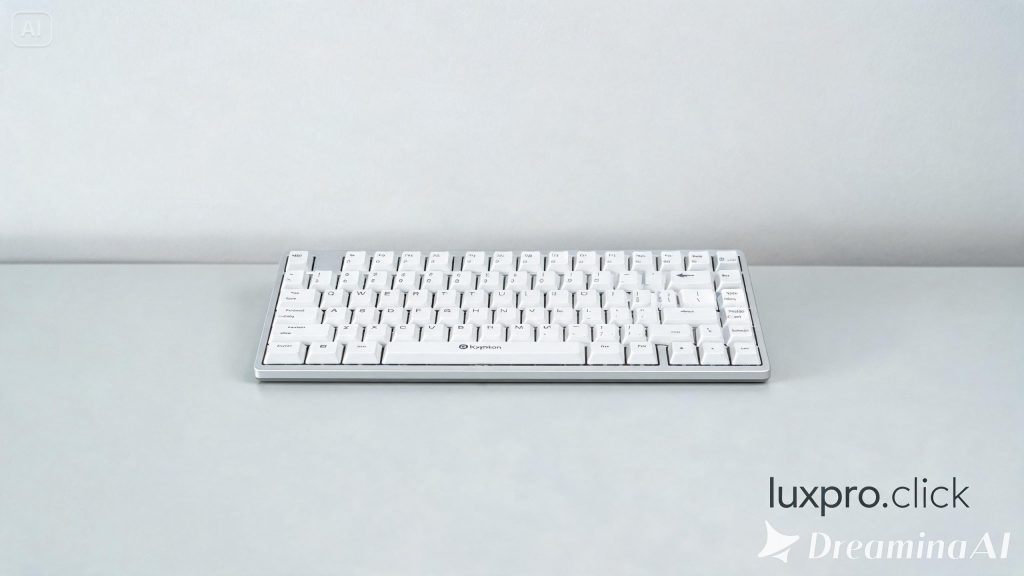
Keychron K2 Compact Mechanical Keyboard
May
Keychron K2 Compact Mechanical Keyboard: The Perfect Bridge Between Wireless Freedom and Mechanical Excellence
The mechanical keyboard market has exploded in recent years, offering enthusiasts and casual users alike an overwhelming array of choices. Among the many options available, the Keychron K2 Compact Mechanical Keyboard has carved out a uniquely beloved position — a keyboard that successfully bridges the gap between the mainstream and enthusiast communities. With its 75% compact layout, wireless capability, and wide switch selection, the Keychron K2 has become one of the best-selling mechanical keyboards globally, and for very good reasons.
Understanding the 75% Layout
Before diving into the K2 specifically, it’s worth explaining why the 75% layout matters. A full-size keyboard takes up considerable desk real estate with its number pad and significant spacing between key clusters. A 60% keyboard, while compact, sacrifices arrow keys and the function row entirely. The 75% layout — as exemplified by the K2 — hits a sweet spot: it retains the arrow keys, a dedicated function row, and most navigation keys while being significantly more compact than a tenkeyless layout. The result is a keyboard that’s genuinely portable yet fully functional for most users.
The K2 measures approximately 315mm × 123mm, fitting comfortably on small desks, laptop bags, and even airplane tray tables. For users who move between workspaces frequently — home office, corporate office, coffee shop — this portability is a genuine practical advantage.
Build Quality and Materials
Keychron has built an excellent reputation for offering exceptional value, and the K2 demonstrates this clearly. The keyboard is available in both an aluminum frame version and a plastic frame version. The aluminum frame version adds significant premium feel, rigidity, and sound dampening compared to the plastic variant, and the price difference is worth considering if you’ll be using the keyboard heavily.
The keyboard features a high-profile keycap design with doubleshot PBT keycaps in the hot-swappable variants. The legends are crisp, precise, and resistant to shine-through from extended use. The keycaps sit on a standard layout that accepts most aftermarket keycap sets, which is a significant advantage for customization enthusiasts.
The K2 weighs approximately 810 grams in the aluminum version, giving it excellent stability during intensive typing sessions. It doesn’t shift or slide on desks, which is a small but meaningful quality-of-life improvement over lighter keyboards.
Switch Options and Typing Feel
One of the Keychron K2’s greatest strengths is its variety of switch options at purchase. Keychron offers the keyboard with Gateron switches (Red, Blue, Brown, Yellow, and more depending on the version), as well as options for Keychron’s own branded switches. Each switch type offers a distinct typing feel:
Gateron Red switches provide a linear, smooth keystroke with no tactile bump and relatively light actuation force. They’re excellent for gaming and fast typists who prefer uninterrupted key travel. Gateron Brown switches add a tactile bump without an audible click, providing feedback for typists who want to know when a key has actuated without disturbing those around them. Gateron Blue switches are clicky and tactile, loved by enthusiasts who enjoy the classic mechanical keyboard experience but potentially disruptive in shared spaces.
The hot-swappable version of the K2 takes this further by allowing users to swap switches without soldering. This means you can experiment with different switches over time, upgrade to premium third-party switches (like Boba U4, Durock L7, or Holy Pandas), or replace a faulty switch without replacing the entire keyboard. For enthusiasts who want to fine-tune their experience, hot-swap capability is invaluable.
Wireless and Wired Connectivity
The K2 supports both Bluetooth 5.1 and wired USB-C connectivity. Bluetooth allows pairing with up to three devices simultaneously, switchable via dedicated function key combinations (Fn + 1, 2, or 3). The switching process takes a few seconds — slightly slower than Logitech’s Easy-Switch but reliable and consistent. The Bluetooth connection is stable with minimal latency for typing purposes, though competitive gamers may prefer the wired mode for guaranteed zero-latency input.
The wired USB-C connection provides a completely lag-free experience and simultaneously charges the internal 4000mAh battery. Battery life varies significantly depending on whether backlighting is enabled — with RGB off, users typically report several months of use; with RGB at full brightness, this drops to approximately 2-3 weeks. The substantial battery capacity is a practical advantage for users who frequently forget to charge their peripherals.
RGB Backlighting
The K2 offers vibrant per-key RGB backlighting with 18 different preset lighting effects accessible via keyboard shortcuts. The lighting is bright and colorful, with smooth animations that showcase the RGB capability effectively. Users can adjust brightness, animation speed, and cycling through effects all from the keyboard itself without any software required.
A Mac-compatible white backlight version is also available for users who prefer a cleaner aesthetic. While software customization via Keychron’s utility is somewhat limited compared to gaming brands like Corsair or Razer, the built-in effects are sufficient for most users’ preferences.
macOS and Windows Compatibility
Keychron has always prioritized Mac users — a demographic somewhat underserved by the mechanical keyboard market. The K2 ships with both Windows and macOS keycap sets included, and a physical switch on the left side toggles between Windows and macOS modes, remapping keys appropriately (Option, Command, and Control behave correctly in macOS mode). This hardware-level remapping means no software installation is required for proper macOS functionality.
The keyboard also works with iOS, Android, and ChromeOS via Bluetooth, making it a genuinely versatile option for users with diverse device ecosystems. The included keycap puller and additional keycaps for platform-specific legends are thoughtful inclusions.
Customization Potential
Beyond switch hot-swapping, the K2 offers considerable customization potential. The standard layout accepts most aftermarket keycap sets, allowing users to dramatically change the keyboard’s appearance. The PCB supports QMK firmware in some versions, enabling deep key remapping, macro creation, and layer customization for advanced users. Keychron has also developed VIA compatibility for certain versions, providing a graphical interface for real-time key remapping.
The keyboard community has produced numerous sound-dampening mods (foam insertion, band-aid mod) that users have applied to the K2 to improve its acoustic profile. The K2’s accessible price point makes it an excellent canvas for learning keyboard modifications without the anxiety of experimenting on a high-end board.
Potential Limitations
No product is without its drawbacks. The K2’s plastic case version can produce a slightly hollow sound compared to aluminum-cased alternatives. The Bluetooth switching speed, while functional, is noticeably slower than competitors like Logitech. Some users have noted that the keycap legends on earlier versions were slightly off-center, though this has been addressed in newer production runs. The stabilizers on budget-oriented versions may require lubing for optimal performance — a common mechanical keyboard maintenance practice that novice users may find daunting.
Value Proposition
The Keychron K2 delivers exceptional value across its price range. At its price point — significantly lower than many competing mechanical keyboards with comparable features — it offers wireless connectivity, hot-swap capability, multiple switch options, quality PBT keycaps, and Mac compatibility. Few competitors offer this combination at this price, which explains the K2’s remarkable popularity and the growth of Keychron as a brand.
Who Should Buy the Keychron K2?
The K2 is an excellent choice for anyone entering the mechanical keyboard hobby, Mac users seeking a quality wireless mechanical option, professionals who value a compact layout without sacrificing arrow keys, and enthusiasts who want a versatile, moddable keyboard at an accessible price. It’s equally at home on a home office desk, in a corporate environment, or traveling in a laptop bag.
Final Verdict
The Keychron K2 earns its reputation as one of the best-value mechanical keyboards available. It successfully delivers a premium typing experience, essential wireless functionality, wide switch compatibility, and excellent platform support at a price that doesn’t require a significant financial commitment. Whether you’re buying your first mechanical keyboard or adding a versatile wireless option to your collection, the Keychron K2 is a decision you’re unlikely to regret.
Overall Rating: 9.0/10
